Camp ZST 2026 Rules
Rules and expectations for participants playing the aforenamed event
Consequences of Breaking the Rules 2
Rule 0.B - Follow all directions given to you by event admins & moderators 2
Rule 0.C - Maintain your personal safety 2
Overview of Humans vs. Zombies 2
Exiting and Entering Play During the Event 9
Original Zombies and Starter Zombies 15
Consequences of Breaking the Rules
If a participant breaks any of the rules listed here, intentionally or otherwise, they will be warned and, if necessary, benched for a short cooldown period. If the participant breaks another rule, or the same rule again, they will be subject to dismissal from the event with no refund. Depending on the severity of the rule broken, the participant may be immediately dismissed from the event with no warning and no refund. The Admins may dismiss any participant for any reason they deem appropriate, including:
- Fighting with a participant or event staff
- Antagonizing a participant or event staff
- Playing in a way that disregards the safety of themselves or others
- Destroying or damaging camp property or Infectionaut property
- Intentionally playing in no-play zones
- Using unapproved equipment
- Breaking any of the rules mentioned in this document
Rule 0
Rule 0.A - Don’t be a Jerk
This event is designed around friendly competition. Give all participants the benefit of the doubt. Be courteous. Be kind. If you have to ask “is this what a jerk does?” the answer is probably “yes” and you shouldn’t do it. Harassing, antagonizing, screaming, name-calling, and fighting of any kind are strictly prohibited. Sportsmanship should be exercised towards participants and event staff alike.
Rule 0.B - Follow all directions given to you by event admins & moderators
Moderators and admins are tasked with looking out for the best interest of this event. They may make changes to the rules, pause play, or otherwise make decisions without prior warning to players. This could be done to keep you or others safe, to keep equipment safe, or any number of other situations. All decisions made by moderators or admins are final and must be followed in earnest.
Rule 0.C - Maintain your personal safety
Players are required to sign a participation liability waiver prior to playing. A Waiver will be shared prior to the start of the event. Look out for your own personal safety and the safety of others when playing during the event. Do not climb buildings or structures. Do not jump from heights greater than 5 feet. Additionally, you may not participate in this event while under the influence of alcohol or other drugs.
Overview of Humans vs. Zombies
Players are split into two teams; the Humans and the Zombies. Most players will start on the Human team–only a small handful will start on the Zombie team. Zombies attempt to tag members on the Human team; if they succeed, the tagged human joins the Zombie team, and tries to tag the remaining Humans. Humans use Nerf™ or other toy blasters that shoot soft projectiles at Zombies. When hit, the Zombies are temporarily stunned. Humans win by surviving to the end of the event and completing missions. Zombies win by tagging all the Humans.
Participation
Due to the complex nature of Humans vs Zombies and its rules, this event is geared towards people aged 18+. Children ages 11 years and below are not permitted to play. Players aged 12-17 must have a participation waiver signed by a parent/guardian. In addition to the waiver, players aged 12-15 must be accompanied by someone aged 18+ who is responsible for their wellbeing. An online participation waiver will be shared prior to the start of the event.
Event Itinerary
This event runs from 3:00 p.m. Friday, May 8th to 12:00 p.m. on Sunday May 10th, 2026. All times are in Central Daylight Time (CDT). This itinerary is subject to change before the event day.
Friday, May 8th
- Check-in begins at 3:00 p.m.
- Pizza at 4:00 p.m.
- Short safety briefing at 5:00 p.m., followed by selection of starting zombies
- 6:00 p.m. game begins
- Play pauses at ~12:00 a.m. Saturday morning*
Saturday, May 9th
- Outdoor Play resumes at ~6:30 a.m.*
- Play inside dorms resumes 7:30am
- Continental breakfast from 8:00 a.m. - 9:00 a.m.
- Catered lunch from 1pm - 2pm
- Catered dinner from 7:00 p.m. - 8:00 p.m.
- Play pauses at ~12:00 a.m. Sunday morning*
Sunday: May 10th
- Outdoor play resumes at ~6:30 a.m.*
- Play inside dorms resumes 7:30am
- Continental breakfast from 7:30 a.m. - 8:30 a.m.
- Final Mission followed by clean-up
- Event debrief at 11:30 a.m., followed by event check-out
- Event concludes by 12:00 p.m.
* At admin discretion
Inclement Weather
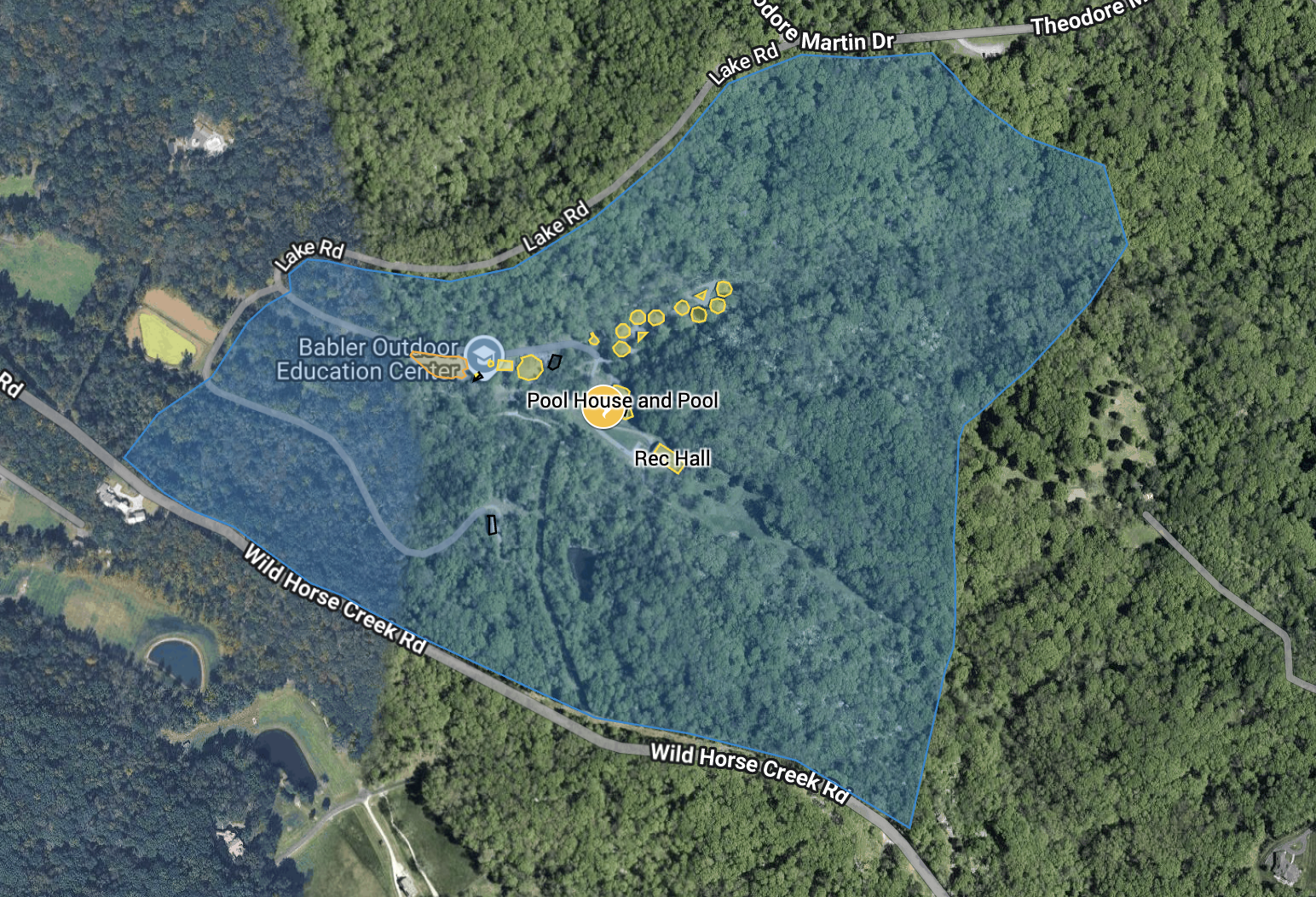
Camp ZST will be played regardless of weather. In the event of severe weather, game play will be paused and all players must make their way to the storm shelter, located beneath the Pool Deck (See map below). If you are not near the shelter and severe weather is fast approaching, take cover inside a building immediately and try to contact Event Staff.
- Lightning
- If you hear thunder within 30 seconds of seeing lightning, head towards the storm shelter
- Game will be paused until 30 minutes after the last lightning strike + thunder
- Tornado
- Event Staff will announce in the Discord and via 3 megaphone sirens if a Tornado Watch is in effect
- all players must be in the non-wooded areas of the camp during a Tornado Watch.
- Event Staff may require players to evacuate to the storm shelter during a Tornado Watch
- Event Staff will announce in the Discord if a Tornado Warning is in effect, and via 3 megaphone sirens; all players must evacuate to the storm shelter during a Tornado Warning
- If you hear tornado sirens, head to the storm shelter immediately
- Game will resume after admins have verified it is safe to do so
- Flash Flooding
- Much of the wooded terrain is on hills; in the event of flash flooding, leave the woods so as to avoid falling in the flood water
- Make your way to the storm shelter
- Event Admins will direct you to safety from there
Play Zones
- The Play Zone is the area contained within the map below
- The game will take place only in these play zones
- Players will check-in to the event at the Administrative building. This building is where event staff will check-in registered players, house event materials, have internal meetings, and treat injured participants. This building is not in play.
Buildings and Furniture
- Do not climb buildings or roofs or camp structures (light poles, fences, railing, etc.)
- Do not remove camp property from the building they reside in
- Objectives, or in-game objects, may be moved and removed from buildings; see the objectives sections for more details
- All objectives will be marked, identifying them as objectives. If an item is not marked as an objective, assume it is camp property.
- You may respectfully move camp property within a building
- Do no toss or throw items; players are responsible for fixing or paying for repairs of any camp furniture, fixtures, items, etc. that they break
- Do not block doors; 36” from the door must remain clear, and doors should be able to open fully without obstruction
- Do not slam doors or windows open or closed
- Do not hide behind a door that will swing towards you when being open or closed.
- Do not travel through windows; players may shoot through or tag through open windows
- Players may open or close windows
Trees
- If you have recent experience climbing trees, you may climb trees
- if you do not have recent experience climbing trees, do not climb them
- Do not climb trees that are too small to bear your weight
- Do not climb trees that are hollow, have visible damage, or otherwise may be dangerous
- Do not damage trees while climbing
- Players may sleep in trees only if they have the appropriate safety equipment to secure themselves to the tree
- Event staff reserve the right to prohibit anyone from climbing trees
- Event staff reserve the right to require any players who have climbed a tree to come down to the ground
Non-Play Zones
- Anywhere on the map in black or beyond the bounds of the play zone is a non-play zone
- Event participants are not to play in these zones
- Event participants may not linger or hide in non-play zones in an attempt to tag, shoot, avoid, or surprise other participants
- Participants should not trample vegetation
- The parking lot may be played in with caution
- Avoid playing next to vehicles.
- If a car is approaching, all participants should call out “car” and temporarily pause play until the car passes
- Roads within the boundaries of play may be played on; cars should not be on the roads beyond the parking lot
- Always use caution around vehicles
- Play may be paused to allow vehicles to pass
Caution Tape
- Yellow caution tape will be used to designate areas that players may not enter
- Yellow caution tape also designates objects players may not touch
- Players may go around areas that are marked with yellow caution tape, but may not touch or cross through
- Yellow caution tape visual:

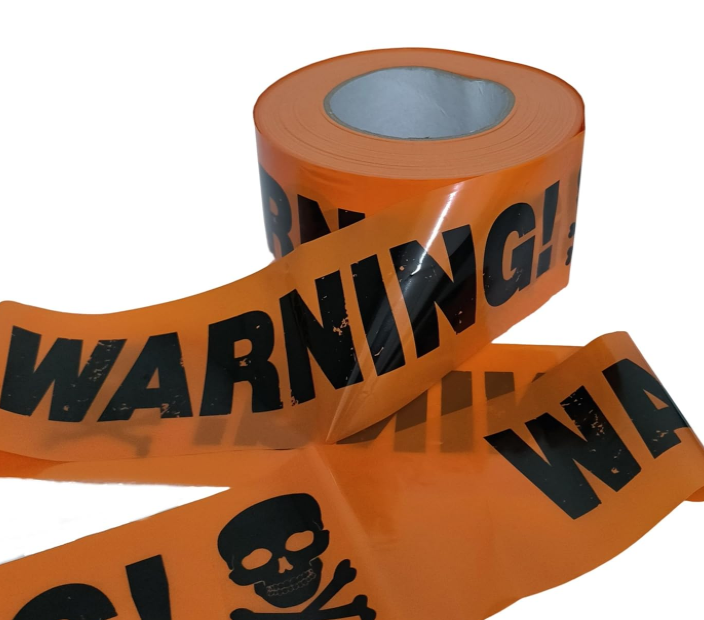
Barrier Tape
- Other colors of tape, that have messages of “Do not enter” or “keep out” will be used to designate areas that human players may not enter
- Barrier Tape also designates objects human players may not touch
- Human players may go around areas that are marked with Barrier Tape, but may not touch or cross through
- Zombie players may touch and cross through
- Tape visual:
Safe Zones
- Players inside a safe zone are safe from being tagged or stunned
- Humans may be inside a safe zone and shoot blasters/throw throwables to stun zombies outside of safe zones
- To be considered inside, the player must have at least one foot within the safe zone area
- Players may enter or leave a safe zone at will
- Safe zones, their boundaries, and duration will be announced by event admins
Vehicles
- Vehicles (cars, motorcycles, golf carts, etc.) are considered out-of-play
- Zombies may not reach into a vehicle to make a tag
- Humans may not shoot out while inside a vehicle
- Humans may not shoot into a vehicle
- A player is considered out-of-play as long as they have at least one foot inside a vehicle
- Vehicles are personal property; do not enter a vehicle without permission from the owner
- Do not climb on vehicles
- Do not get underneath vehicles
- Players must park in the Babler OEC parking lot
- Players may not park on the street
- Players may not park in other parking lots within the state park
- Do not operate a vehicle while in-play
- It is intended for all participants to stay at the Babler OEC for the entirety of their time at the event; should you choose to leave the camp during the event, let an event admin know, and use extreme caution while operating your vehicle within the OEC:
- Turn your hazard lights on
- If dark, use your headlights and brights
- For the purposes of sleeping in your car and tagging/stunning players, cars count as tents.
Restrooms
- The dining hall restroom will be out of play
- For any out-of-play restrooms:
- If a participant enters a designated no-play bathroom:
- Do not follow them in unless you also need to use the facilities
- Do not stalk just outside the bathroom, waiting for them to emerge
- Do not run into the bathrooms to avoid being stunned/tagged
- All non-marked restrooms will be in-play
- Treat people with respect around bathrooms
- If a human is using an in-play restroom, zombies may tag the door or shower curtain in lieu of tagging the human directly; this will count as a tag
- If a zombie is using an in-play restroom, humans may stun the door or shower curtain in lieu of stunning the zombie directly; this will count as a stun
Dining Hall
The eatery and kitchen within the dining hall are in play. If you have medication that requires temperature control, it will be stored in the kitchen refrigerators. Only players with explicit permission from Event Staff may access the kitchen refrigerators. Inside the Dining Hall (including the kitchen area) will be out of play on Friday night to accommodate late check-ins. Mods will announce when it is back in play.
During specific meal times, the dining hall will be out-of-play. Meal times will be announced via discord, and the whiteboard in the dining hall. The first 15 minutes of all meal times inside the dining hall will be a safe-zone time.
Kitchen
Moving through the kitchen (inside of the dining hall) will be a waterfall effect, described as follows: Once you step one foot inside the first doorway, you must continuously walk at a normal pace to the second doorway. Once both feet are 12 inches past the second doorway, you may run again. The kitchen is a no play zone while you are waterfalling through.
Storage Area
There is a storage area behind the dining hall that is not in play. This area contains trucks, dumpsters, old equipment, sheds, etc. Players may not enter this storage area.
Smoking
Smoking (which includes using e-cigarettes and vapes) is only allowed in the parking lot. Players taking a smoke break may remove their bandana during their break. All smoking trash (cigarettes, cartridges, etc.) must be disposed of in the proper receptacle (ash tray, trashcan, etc.). Upon finishing their break, players must immediately reapply their bandana. Recreational marijuana is not allowed at Camp ZST.
Ponds
Players may not swim or wade in ponds.
Water Jugs
5-gallon water jugs will be placed around the camp for players to use to refill cups or water bottles; these are in-play. If a player knocks over a water jug, they must restore it back to the condition it was in. If water was spilled, they must transport the jug to the dining hall, refill the jug, and then transport it back. Players remain in-play, and may be stunned or tagged, while restoring the water jug.
Cardboard boxes
Large, ~3’x3’x3’ boxes will be used as make-shift walls and obstructions. Players may not move or relocate these cardboard boxes. If a player knocks a box over, they must restore the box back to the condition and position it was in. The player who knocked over a box remains in-play while restoring the box.
Play Zone Map
Non-Players
- A non-player is anyone who is not playing in this event and is not event staff
- IFNT has exclusive use of the Babler OEC, so there should not be any non-players staying on location during the weekend
- However, the camp resides within a state park that is open to the public and patrolled by park rangers; non-players may find themselves within the boundaries of play
- Should you come across a non-player within the boundaries of play:
- Consider pausing play
- Notify event staff
- Introduce yourself and ask what they are up to
- If they are lost, help direct them back to a main road
- If there is something else going on, notify event staff and let them manage the non-players
- Should a park ranger or police officer enter the play zone
- Immediate call a game pause
- Remove any face coverings or masks
- Contact event staff if a member is not already present
- Follow their orders and be respectful
Game Clock
- The official clock of Camp ZST 2026: https://www.clocktab.com/
- All game-related activities will use this clock for timing
Game Pause
- The game may need to be temporarily paused for various reasons, including: someone is injured, non-participants are in the play-zone, equipment is damaged or broken, a serious mission/game flaw needs to be rectified, etc.
- A “Game Pause” will be signaled by event staff using a long whistle blow followed by them yelling “PAUSE”
- Players are prohibited from having whistles
- Upon hearing a Game Pause, stop exactly where you are
- Players may not: pick up ammo, reload, continue solving a puzzle, etc.
- Players may: sit down, kneel, hydrate, apply sunscreen/bug spray, talk quietly to the people next to them, etc.
- Players DO NOT have to drop objectives during a game pause
- If something occurs that requires a “Game Pause” and event staff are not around, players may call a “Game Pause” themselves
- Depending on the severity of the occurrence, event staff should be notified of the pause
- Do not call a game pause frivolously, or to gain an advantage.
Exiting and Entering Play During the Event
The intent of this game is for players to spend as much time as possible in play. However, should you need to temporarily remove yourself from play, there will be a designated Out-Of-Play zone inside the Dining Hall
- Notify an event admin or mod that you’re exiting play (there will always be an admin in the admin building) and then move to the designated Out-Of-Play zone in the Dining Hall
- Remove your bandana. You are now out of play, and may move where you need to, to take care of business.
- To re-enter play, notify an event admin or mod that you will be re-entering play, head back to the no-play zone of the dining hall, and then put your bandana on.
- You will be in play once you leave the designated area of the Dining Hall.
Players may not exit play to avoid being tagged/stunned.
In the event of an emergency, DO NOT use the exit steps above. Notify an event admin or mod of the emergency and all play will be suspended immediately to address the emergency. Event admins or mods will resume play when it is safe to do so.
Clothing, Gear, and Masks
- Players must wear clothes that cover their chest, groin, and buttocks.
- Clothes that are profane or pornographic are not allowed.
- Chest rigs and tactical gear are allowed.
- Costumes and masks are allowed.
- Event staff may ask you to remove your mask to confirm your identity.
- Should you choose to wear gear/rigs/costumes that look like real combat attire or are threatening, it is extremely important that you never leave the boundaries of the camp during the event while wearing your gear.
- Leaving the play area, particularly while in combat-esque gear, may result in an immediate dismissal from the event
- Should you stumble upon non-participants (hikers, campers, rangers, etc.), immediately identify yourself and remove any masks or face coverings.
Equipment
Banned Equipment
The following items are not allowed either by Babler OEC or Infectionaut Labs:
- Whistles
- Firearms
- Weapons
- Flammable liquids, excluding camp stove fuel
- Alcohol
- Illegal drugs
- Recreational marijuana
- Power tools
- Fireworks
- Thermal Optics (anything that senses body heat). Night vision Optics are allowed All Night sight devices are subject to admin regulation.
Flashlights, Lamps, and Lanterns
- Light sources must be less than 1000 lumens
- Light sources may not be mounted on blasters
- Light sources must not be shined into people’s eyes
- Headlamps must use red light.
- Strobe or flashing effects are not allowed
Laser Sights
- Laser sights may be allowed, following strict guidelines:
- Laser sights must be Class 3R (1-5mW) or lower per Laser Safety Sheet
- You must be able to prove your laser’s sight class or rating
- Players must not shine laser sights into people’s eyes
- If lasers become a problem, event staff withhold the right to ban their use during the event at any time
Food and Drink
- Meals will be provided by IFNT as part of this event.
- You may bring your own food so long as it doesn’t require a heat source to prepare.
- Water coolers will be filled and placed around camp with disposable cups; we recommend you bring a refillable water bottle.
- There is a fridge in the dining hall that you may use to store food and drinks.
- Do not touch or remove food in the communal fridge if it isn’t yours.
- IFNT is not responsible for stolen food or drinks in the communal fridge.
- Food may not be consumed within the non Dining Hall buildings.
- Food must be consumed outside, in the dining hall, or in your vehicle.
Medicine
- Players may keep medicine on their person as necessary
- If you have medicine that requires temperature control, please notify event staff upon check-in
- You are responsible for administering any medications you may need; IFNT is not responsible for administering your medications
Radios & Walkie Talkies
- Radios & Walkie Talkies are allowed
- Event Staff will be using Channel 5 on radios to communicate
- Players must stay off Channel 5; players found to be listening to the event staff channel will be warned or dismissed from the event at event staff’s discretion
- Players may tune their radios to Channel 4 to hear in game announcements. This will be a one way communication channel for event admin to communicate info to players.
- Admin Radio frequency is 460-470 MHz.
- The exact frequency and tones for the announcements channel:
- Channel ID: 4
- Frequency (MHz): 462.425
- Tone Mode: TSQL
- Tone Squelch: 103.5
- rTone Frequency: 88.5
- cTone Frequency: 103.5
- Cross Mode: Tone -> Tone
- Mode: FM
Tents
- Players must ask permission from the owner of a tent to enter.
- Zombies may not enter a tent in order to make a tag. However, zombies may tag the surface of a tent to tag every human player inside.
- Humans may not shoot from inside the tent.
- Humans may not enter a tent in order to make a stun. However, humans may stun the surface of a tent the same way they would stun an actual zombie, to stun every zombie player inside.
- Tents are in play starting at 6:30am on both days when outside play resumes.
Missions
This game will have a series of missions and objectives. Missions are often for humans to accomplish but sometimes for zombies as well. Mission participation is optional for both teams; however, we highly encourage everyone to participate as they are the most fun and engaging parts of the game.
Objectives
Objectives may be used by players as part of missions, or they may be turned into event admins to receive rewards. The purpose of an objective will be described in the mission briefing that they pertain to.
- Objectives will either:
- Be described in detail by event admins as part of a mission briefing
- Or be clearly marked as an objective, with indicators as to which team the objective is for
- Purple Markers = Zombie only objectives
- Orange Markers = Human only objectives
- Green Markers = Both teams, humans and zombies, may interact with the objectives
- Players may not interact with objectives:
- that do not belong to their team
- if they don’t know what mission or purpose the objectives serve
- Players may only interact with objectives after they know what mission and purpose they serve
- Players may only hold objectives in their hands, and only hold 1 objective per hand
- Objectives are treated as an extension of the player’s body.
- Players must drop any held objectives before going out of play if the game is not paused
- During game pauses (all players are out of play) objectives do not need to be dropped
- If players break objectives or other provided IFNT equipment, replacements will not be given. If the broken objective means you cannot complete the mission = you fail the mission.
Main Missions
Main missions progress the game. Successfully completing main mission objectives will aid your team in completing other missions and contribute to your team’s victory.
Main Mission Briefings
Prior to the start of each mission, players will be gathered and given information about the mission and its objectives. A board will be posted in the dining hall with main mission times. All briefings will take place in the Dining Hall. The Dining Hall will become a temporary safe zone 15 minutes prior to mission briefing, up until mission start. All participants at the briefing location are out of play during the briefing; players not at the briefing location are in-play. Players may ask questions regarding the mission during the briefing. Once the briefing concludes, play will resume (zombies may be escorted some distance away from the briefing location after the briefing concludes but before play resumes). Briefings will also be posted in the appropriate Discord channel. If no humans are present at the mission briefing, the admins will assume that all humans have been turned and issue a reset to re-allocate human and zombie players, after which the briefing and mission will continue.
Main Mission Completion
Once all mission objectives have been completed or time has expired, event admins will alert participants that the mission has been completed. An announcement will also be made in the appropriate Discord channel. Players will still be in play at this time. Should a main mission be abandoned (meaning no players from the team the mission is assigned to are actively working towards completing at least one objective) for more than 10 minutes, the admins will end the mission.
Side Quests
Side quests will be available to players at all in-play times during the event. Players can work on and complete side quests whenever they choose, aside from main mission briefings or any other times that the event admins suspend play. Participants who complete side quests will gain extra perks or other bonuses for their team. Players will find side quest cards out in camp. Once found, take the card to the admin building and pin it to the “Side quest board” for all players to access. Cards will be colored based on who the mission is for.
Orange = Humans, Purple = Zombies, Green = Both humans and zombies
Player Rules
The following rules apply to all players:
- Wear your Grey Player ID (provided by Infectionaut Labs)
- Wear a bandana that contrasts with you hair/skin/clothes
- Humans wear bandana tied to arm, between elbow and shoulder
- Zombies wear bandana tied to head above eyes
- Bandanas may not be obscured by headbands, hats, long hairstyles, etc.
- Wear safety glasses or goggles
Tagging
- A tag is a firm, open-palm touch on any part of a human, including any gear they carry
- A firm touch on a backpack, pack, blaster, jacket, etc. all count as tags
- Be respectful when tagging (do not tag inappropriate areas on a person)
- Prioritize your safety and the safety of others over making a tag
- Doing something unsafe or dangerous to secure a tag is prohibited
- Intentionally tackling, sliding, or running into humans is prohibited
- An example of one way to make a tag while running: If a zombie is charging towards a human, the zombie should run slightly left or right of the human. Extend your arm to make the tag as you pass by the human.
- Zombies may make consecutive tags, but are responsible for ensuring each one is logged correctly
- Zombies must return to the scene of the tag within 5 minutes to claim the tag.
- Failure to do so will result in the tagged human remaining human.
- When a human is tagged with no extra perk lives available, they must
- Give their Orange Human ID tag to the zombie that tagged them
- Leave the field of play if there is activity happening around them
- Drop any objectives they are holding
- Remove their bandana from their arm
- When a human is tagged with a Perk ID on them:
- Give their Perk ID to the zombie who tagged them
- Find the nearest active human and high-five them to rejoin the game
- These rules apply for the human that a stim vial is used on as well
- If the zombie fails to return within 5 minutes, the human may reapply their bandana, pick up any dropped objectives still on the ground, and resume playing as a human
- If the zombie comes to collect the tag, the tagged human must
- Give their Orange Human ID tag to the zombie that tagged them
- Remove all of their human equipment (blasters, throwables, etc.)
- Removed equipment should be stored, either in a vehicle, in a storage tote, etc.
- The tagged human can then begin playing as a Zombie, after respawning and tying their bandana around their head
Logging a Tag
- When a zombie successfully turns a human, the human must hand the zombie their Orange Human ID. The zombie must present the Human ID(s) and their Player ID at the admin pit to log the tag.
Stuns
- A stun is a hit on any part of a zombie, including any gear they carry, by a projectile, rolled sock, or melee contact.
- Ricochets of ammo and throwables off of players or their gear, also count as stuns.
- A stunned zombie may not interact with the game. Interactions include but are not limited to:
- Looking for objectives
- Discussing game strategy with teammates
- Sharing the location(s) of humans with active zombies
- Acting as a “shield” for active zombies
- Interfering with humans
- Stunned zombies should immediately leave any areas where humans and zombies are actively playing.
- Stunned zombies must do at least one of the following until they respawn:
- Pull their bandana down around their neck
- Pull their bandana off their head and carry it in hand
- If a zombie is asked whether they are stunned or how long until they can respawn, the zombie must answer promptly and honestly.
Disputes
If a human & zombie are in disagreement over whether they were stunned/tagged:
- Defer to any event staff who witnessed the event
- Follow their ruling: staff are humans too and sometimes make mistakes. Sometimes those mistakes favor you, and sometimes they favor someone else.
- If no event staff witnessed the event, defer to a player who witnessed the event whom neither of the involved parties are close to
- This is to prevent bias from asking your buddy whether they saw you get tagged/stunned or not
- If no player witnessed the event, parties involved in the dispute may agree to a game to settle the dispute.
- Examples: coin flip, roshambo, rap battle, race, etc.
- All involved parties must agree to the game
- If a game cannot be agreed upon, a member of the event staff will choose a game for you.
- Other players should not interact with players solving a dispute
Respawns
In order for a stunned zombie (or freshly tagged human) to become active, they must respawn.
Respawn Methods
After a stunned zombie has touched a respawn beacon or a rolling respawn has elapsed, they may place their bandana back around their head.
Rolling Respawns
- All zombies respawn at the same time based on the clock
- As an example, respawns may be set “On the 2s” meaning at 12:00, 12:02, 12:04, etc. all stunned zombies respawn
- The timer will be announced via Discord and at mission briefings, and may change throughout the event
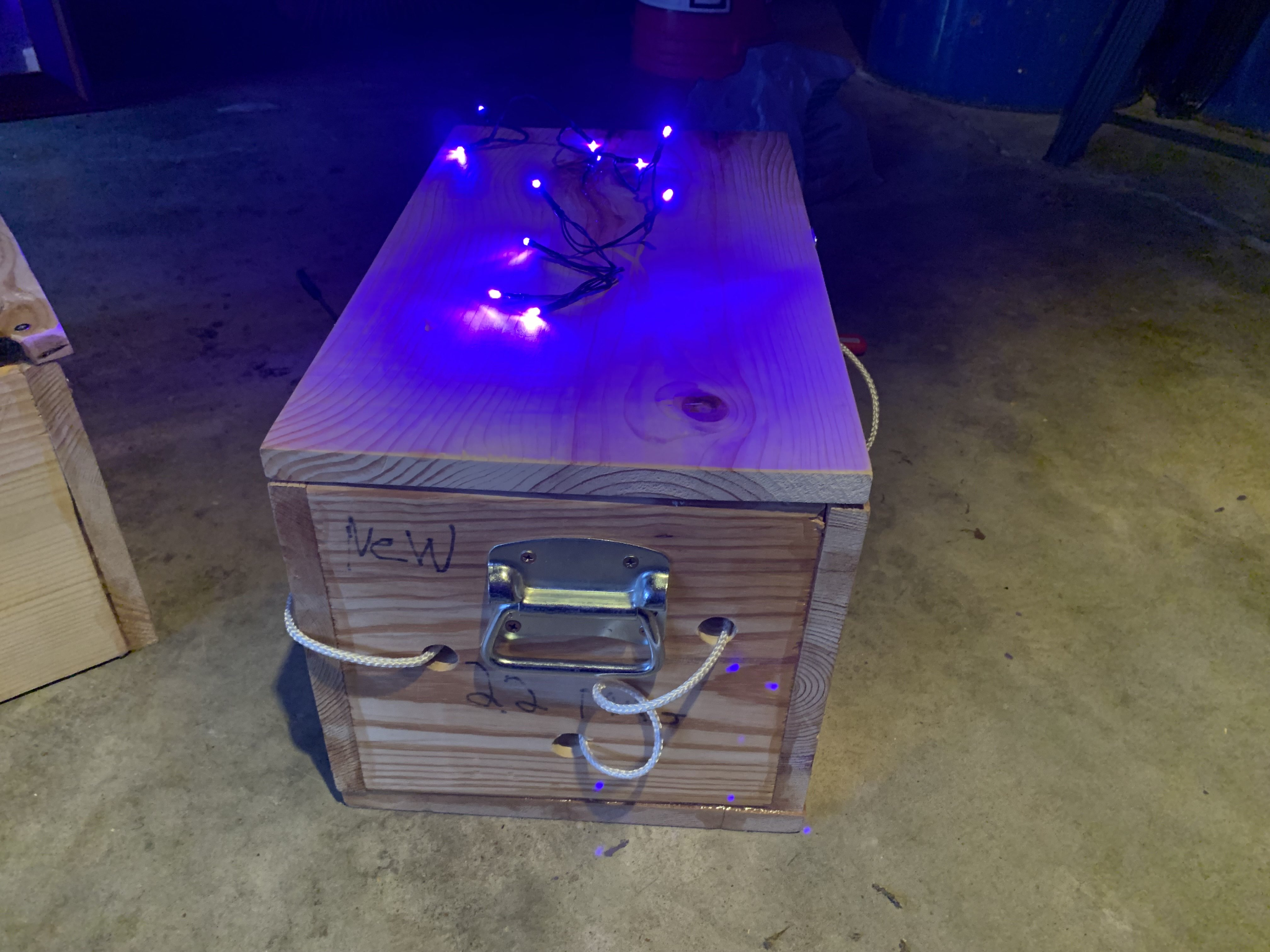
Respawn Beacons
- Respawn beacons are active when
- Set on a flat surface
- Lights around/in the beacon are switched on
- Zombies may touch an active beacon to respawn instantly
- Humans may deactivate a respawn beacon by switching off the lights
- Humans may not relocate beacons or their parts
- Humans may disable beacons as needed in order to switch off the lights
- Zombies may not re-activate respawn beacons
- Zombies should return deactivated beacons to the event admins
- Beacon example:
Respawn Protocol
- When using the rolling respawn method, stunned zombies must be a minimum of 30 feet away from any humans in order to respawn
- If the stunned zombie is not more than 30 feet away when the rolling timer hits, they are still stunned and must wait for the next timer
- When using the respawn beacon method, the stunned zombie has no minimum distance
- Stunned zombies may immediately respawn even if humans are standing next to the respawn beacon
- Stunned zombies must reapply their bandana to their head prior to becoming active again
- Zombies are not active until their bandana can stay on their head without being held
Spawn Camping
- Humans should not restrict or prohibit zombies from respawning for the sole purpose of keeping them stunned; this is a form of harassment
- “Spawn camping”, where the sole objective is to prevent a zombie from respawning, may look like:
- Charging within 30 feet of stunned zombies just before a rolling respawn timer to prevent the zombies from spawning
- Following a specific zombie and continuously stunning them
- Continuously shooting at an already stunned zombie when it is evident the zombie is stunned
Zombie Rules
Win Condition
- Tag all of the humans prior to the end of the event.
Original Zombies and Starter Zombies
Players should choose one of the following options when purchasing a ticket:
A lack of volunteers for starter zombies or OZs will result in a draft.
Do you want to be a Starter Zombie? NO Do you want to be an Original Zombie? NO | You may start mission zero as a human and you may start mission one as a human |
Do you want to be a Starter Zombie?YES Do you want to be an Original Zombie? NO | You may be a zombie for mission zero, and will return to human for mission one |
Do you want to be a Starter Zombie? NO Do you want to be an Original Zombie? YES | You will be a human for mission zero, but may be an OZ for mission one. |
Do you want to be a Starter Zombie? YES Do you want to be an Original Zombie? YES | You may be a zombie for mission zero, and may be an OZ for mission one. |
Original Zombies
- Original Zombies (OZ’s) will start in Mission 1 as Zombies to kickstart the horde
- OZs will have a Purple Pinnie, denoting them as OZs.
- After making a successful tag, OZ’s may either:
- Take a player’s Perk ID as normal, or
- Ignore Perk IDs and turn the player immediately. OZ’s can only use this once, and will relinquish their pinnie once used.
- *After turning 2 Humans, OZ’s may choose to become a normal Human
- OZs who choose this route must return their purple pinnie to the admin pit, remove their bandana from their head, gear-up as a human, and high-five an active human to rejoin the game
- *The 2 human limit is subject to change at admin discretion
Starter Zombies
- Starter zombies will start the game in Mission Zero.
- These zombies are not OZ’s. They are just normal zombies.
- All starter zombies will return human at the start of mission 1.
- Any humans turned zombie during Mission Zero will revert back to human for Mission One. Humans will not turn over their Human ID or their Perk ID for Mission Zero. Humans will turn zombie on the first tag during Mission 0.
Human Rules
Win Condition
- Survive the game without being tagged. Successfully completing missions increases the chance of survival.
Blasters
All blasters that a human intends to use must be inspected during check-in to ensure they follow the rules listed below. Blasters may be subject to review and/or removal by event admins at any time. Participants will be required to put all disallowed blasters back in their vehicles, storage totes, etc.
Concerned your load-out may not be approved? Hit up the #Q and A chat in the discord; post a picture of your load-out and your cause for concern ahead of the event, to speed up the check-in process.
Blaster Requirements
- Blasters that allow for the changing of the velocity of the projectiles using a slide, scale, set of buttons, or any other easy-to-adjust mechanism, where at least one velocity setting is above the listed FPS caps are not allowed.
- Blasters may use an adjustable fire rate or other interface not pertaining to projectile velocity
- Blasters that allow for variable priming strength or draw weight, where the max would result in exceeding the FPS caps listed below, are not allowed
- Examples include sling-shots, bows, etc.
- Blasters should not have any sharp or rough edges, points, or other features which could break skin.
- Muzzles must have a rounded muzzle device covering them or be beveled or otherwise smooth to the touch.
- Should a blaster jam or break during the event, participants may restore it back to the condition it was in during check-in
- Admins may require the repaired blaster to be reviewed prior to using it.
Paint and Aesthetics
All blasters must adhere to the below color codes.
- The tip where projectiles are fired from must be bright orange
- Participants may wish to bring orange tape as a way to meet the orange tip requirement
- The blaster must not look like a realistic replica of a firearm
- From all angles, the blaster should look like a toy.
- Admins may disallow a blaster for looking too much like “real steel” upon check-in
- Due to this event being exclusive, blasters may make use of dark or realistic colors
- IFNT always encourages participants to use blasters that are brightly colored
Banned Blaster Types
The below list of blasters are not permitted.
- Zing Bows or any bow & arrow toy that shoots a long, narrow rod with a foam tip
- Blow guns
- Potato cannons
- Full PVC Constructs
- CO2 Powered
- HPA
- LPA
- Blasters with exposed internals or hazardous mechanics
- Blasters with exposed wiring or battery cells
Miscellaneous Banned Blaster-Related Objects
- “Grenades” that shoot ammo when tossed
- Tripwires or Trigger Devices
- Remote-Activated Blasters
- R/C vehicles
- Drones
Allowed Ammo Types
The below are the types of darts or toy ammunition allowed. Generic brands of the below types are also allowed.
- Darts
- Full Length
- Half-Length
- Ultra
- Mega
- BoomCo
- Rounds
- Rival
- X-Shot
- Discs
- Vortex
- Reactor Balls
- Demolisher Rockets
- Titan Rockets
- Mega XL
Banned Ammo Types
The below is a non-exhaustive list.
- Hard tipped ammo
- Full Vinyl Jackets (FVJs)
- Stefan/Homemade ammo
- Incompressible Rival
- Modified Tips
- Paintball
- Airsoft
- Gel Ball
- Zombie Strike or Rebelle Arrows
- Worker Heavyweight 1.2gs
- “BLU” brand half darts
- 0.50 cal foam balls
- Hyper
FPS Caps
Ammo Type | FPS Soft Cap (Max Average) | FPS Hard Cap (Max Allowed) |
Full-Length, Half-Length, Rival, Ultra | 120 FPS | 130 FPS |
Mega/Vortex | 100 FPS | 110 FPS |
BoomCo, Rockets, Multi-Ammo Absolver, Mega XL | 70 FPS | 80 FPS |
Blaster Testing Process
- In the event of a line greater than 5 people, players may only chronograph 2 blasters before being required to get back in line
- Players must fire 5 times from each blaster through a chronograph
- Event Staff doing blaster testing reserve the right to ignore chronograph results that are clearly flukes
- Flywheel blasters must be tested at max rev
- Players must use the ammo they intend to use during the event while testing their blaster
- Should a blaster be able to fire more than one ammo type, and should the participant intend to use more than one ammo type with the blaster, they must test the blaster for each ammo type.
- To pass, a blaster must
- Average below the listed soft FPS cap
- Have no shots exceed the hard FPS cap
- If a blaster fails, the participant may make modifications and re-test the blaster
- Event staff reserve the right to disallow blasters they deem unsafe, against the spirit of the rules, or otherwise unfit for this event
- Once approved, the event staff member will place a colored zip tie on the blaster, to indicate it has passed
- After a blaster is tested and approved, participants may not make any modifications to the blaster, such as changing springs, changing battery types, rewiring, removing the orange tip, etc.
- Players found to be modifying approved blasters to increase performance will be subject to a warning or dismissal from the event at staff’s discretion.
Blaster Tiers
Blasters are categorized under the following tiers
Single-Shot
Single-shot blasters may only have 1 piece of ammo loaded into the blaster at a time. If a blaster uses external ammo loading devices (magazines, hoppers, cylinders, shells, etc.), and those devices have the potential to hold more than 1 round, the blaster is not considered a single-shot. If a blaster uses internal storage for loading ammo, and that storage has a capacity greater than 1, the blaster is not considered a single-shot.
Examples of single-shot blasters: Nerf Jolt, Nerf Rival Knockout, Dartzone Max Solo
Mechanical
Mechanical blasters must be primed and fired by human or non-electronic systems, such as springs.
Examples of mechanical blasters: Nerf Hammershot, Nerf Hades, Nerf Rampage
Electric
Electric blasters are those that are primed or fired using electronic components, such as batteries. Blasters that have light, sound, or aesthetic effects (such as lighting up when primed or making a sound when fired) via electronic means are not considered electronic blasters.
Examples of electric blasters: Nerf Perses, Nerf Stryfe
Blaster and Ammo Tokens
- Blaster and Ammo Tokens may be found hidden in the playzone, or may be the reward for completing missions.
- There is no limit to the number of unused Blaster and Ammo Tokens a human may carry
- Any Blaster and Ammo Tokens carried by a human are lost when they are turned
- All ammo and blaster tokens must be secured to the blaster with which it will be used via keyring (provided at blaster check in) or the player’s chain (provided at registration check-in) which must be worn around the neck only if there’s no space on the blaster.
Blaster Tokens
The appropriate blaster token must be secured to the keyring or chain to unlock the use of the approved blaster
- Blue dog tag = Mechanical blaster token
- Pink dog tag = Electrical blaster token
Ammo Tokens
An Ammo Loading Component (ALC) is any device that a player must load with ammo prior to being able to fire their blaster. Examples include magazines, hoppers, and cylinders. ALCs may be integrated as part of a blaster, or may be an external stand-alone device. Ammo Tokens allow for the use of ALCs to store/feed ammo. Players may carry as much loose ammo as they wish, but may only carry as many ALCs on their person as their Ammo Tokens can cover.
- One Ammo Token covers up to 25 rounds of ammo capacity. This can be split between different ALC’s as long as the total for all ALC’s is not more than 25.
- ALCs with greater than 25 rounds of capacity require more Ammo Tokens to use
- 2 Ammo Tokens cover up to 50 rounds in one ALC, or may be split between multiple ALC’s as long as the total does not equal more than 50.
- Single-Shot blasters do not require Ammo Tokens.
- Bright green dog tag = Ammo Token
Internal ALC Examples:
- Nerf Hammershot: requires 1 Ammo Token
- Nerf Artemis: requires 2 Ammo Tokens
- Nerf Perses: requires 2 Ammo Tokens
- Nerf Prometheus: requires 8 Ammo Tokens
External ALC Examples:
- One Ammo Token: four 6-round mags OR two 12 round mags
- Two Ammo Tokens: One 50 round mag OR One 35 round mag and a 15 round mag
Example Load-Outs and Required Blaster and Ammo Tokens
Nerf Rival Fate: 1 Single-Shot with a ziptie on it (provided at blaster check-in)
Nerf Hammershot: 1 mechanical blaster token, 1 Ammo Token
Nerf Nemesis with 100-round hopper: 1 electric blaster token, 4 Ammo Tokens
Nerf Stryfe with 3 18-round magazines: 1 electric blaster token, 3 Ammo Tokens (one Ammo Token per magazine)
Two Nerf Hammershots: 2 mechanical blaster tokens (one for each blaster), 2 Ammo Tokens (one for each integrated cylinder)
Starting Load-Outs
During Mission Zero, all blasters will be allowed, even without the required blaster and Ammo Tokens. After Mission Zero, blaster and Ammo Token rules will be in place, and all players will start with only Single-Shot blasters and any number of throwables they wish to bring.
Throwables
- Throwables may be used to stun zombies by tossing or throwing from the hand
- Launchers, slingshots, etc are not allowed
- In this event, you are throwing throwables at people, not at objects
- Players who throw unnecessarily hard will be prohibited from using throwables for the remainder of the event
- Throwables must compress when squished and be made entirely of soft materials
- Throwables must not present a tripping hazard
- Throwables may not have any sharp edges or exposed hard spots (buttons, hot glue, zippers, etc.)
- Throwables must fit within a 5” sphere
- This does not include ammo.
Socks
- Socks are a specific type of throwable
- Socks may be rolled/folded to use as throwables
- Sock interior may not contain any object besides sock material
- Tape or velcro (fuzzy side) may be applied to the exterior of the sock.
- Tape or velcro may not cover more than 50% of the sock’s surface area
- Socks must be clean and unworn
Throwable Testing Process
- Players using throwables must join the blaster testing line to get their throwables approved
- Each type of throwable will be considered 1 test for the purposes of how many things you can test at a time
Melee and Shields
Participants are not allowed to use their own personal melee toys or shields. Any melee toys and shields will be provided by Infectionaut Labs during the event in the form of a Perk. See Human and and Zombie Perks for more information.
Wounds
Humans may become wounded. When wounded, a human must remain motionless (i.e. no firing blasters, using throwables, reloading, walking, running, etc.) until they do both of the following:
- Choose one hand
- Empty that hand of all equipment and objectives and raise it above your head
After doing the above, wounded humans may move like normal, but may not use the hand that is held above their head. Humans remain wounded until the next rolling respawn, or until tagged with both hands by a Medic.
Perks
Gear that modifies gameplay. Players may only have 1 perk at a time. Active players may trade their perk with other players on their team. If a human is tagged and becomes a zombie, their perk is lost; no other humans may claim their perk. All perks will have some physical visual identifier that will be disclosed prior to the start of the event.
Perk IDs
Every human will start the game with 1 Perk ID, in addition to their Human ID. Humans may have more than one Perk ID. When a human is tagged, if they have a Perk ID, they may hand their Perk ID over to the zombie that tagged them and remain human. The zombie can exchange two Perk IDs to get a perk.
Unlike with Human IDs, zombies do not need to log a Perk ID. Newly turned Zombies may not redeem Perk IDs they carried when they were human–these will need to be turned in to event staff. Original Zombies who have a purple pinnie may choose to ignore all Perk IDs and immediately turn a human. They only have this ability once.
Human and Zombie Perks
Humans and Zombies will unlock perks by completing side quests and main missions.
Players may only have 1 perk on them at a time (excluding stim vial, lock pick, and wagon human perks)
Duffel Bag
Clear bag that can carry as many objectives as it can hold. The wielder must carry it everywhere while they’re in play and, if wounded or stunned, must empty the bag without taking it off.
Cryptid Bow
A bow that allows the wielder to turn a player to their team by hitting them with an arrow.
- Player must be active to use and shoot
- Human hits a zombie, or their upgrade/gear (shield, noodle, etc)–Zombie becomes Human again
- Zombies must be active (not stunned) when shot to successfully return human
- Zombie hits a human (including blaster or gear)–human turns Zombie
- Ammo is dead upon hitting the ground and cannot be used again.
- Wielder will have 5 shots total. May be transferred to other members of your team.
- Stim Vials and Perk ID’s do not work against Cryptid Bow
Human Only Perks
When a human turns, they must take any perks they have to the admin pit to turn in.
Humans at any point may visit the admin pit to reclaim perks that were lost when another human turned.
Humans do not need to visit the admin pit to swap perks with other human players.
Sword
Pool noodle sword that can stun zombies. Limit one (1) per human.
Wagon
Can hold X number of objectives (number will be posted on side of wagon) for transporting. Must stay on concrete paths around camp. One person on the scooter moves the wagon. In order to move the scooter, player must have at least 1 foot on the scooter or on the ground at all times with both hands on the handle bars. If no human is on the scooter, an active zombie may get on the scooter and move the wagon, and can only interact with objectives that apply to them inside the wagon (green marked objectives).
Medic
Human with a reflector on a red bandana that must be worn on the head. Tagging a human with both hands instantly removes their wound.
Stim Vial
A syringe with a slip of paper inside. When tagged, a human pushes down the syringe, crumpling the paper, and hands the syringe to the zombies, who may use it the same as a Perk ID. Unlike Perk ID’s, humans may use a stim vial on another human. Stim vial must be used before Perk ID. The human that the stim vial is used on must find the nearest active human and high-five them to rejoin the game. Humans may only carry 1 stim vial at a time. If humans die with an unused stim vial, they must turn it in at the admin pit.
Lock Pick
A one-time use item. Just a note card that says "lock Pick ability". Take to a mod and tell them what you would like unlocked. Mod will unlock it, or provide the code to unlock it.
Recon
Identified by Black Pinnie, Recon crosses their wrists above their head to be invulnerable to tags for 30 second intervals. Must count down from 30 to 0 upon entering recon mode. At zero, human exits recon mode and must take 5 steps before being able to re-enter recon mode. Recons in recon mode can be tagged by Ghosts in ghost mode
Gauntlet
2 Green fist gloves that allows wielder to tag active OZs (not any other zombies). Once tagged, the OZ becomes stunned, and remains stunned while wielder places one fist on OZ’s shoulder and walks them to the admin building. Upon reaching the admin building, OZ is stripped of their OZ Token.. If Wielder abandons OZ before reaching the admin building, OZ may respawn on the next rolling respawn as normal. At any point when wielder is tagged by a zombie, they take a knee, count down from 3, and stand at 0. If tagged a second time while counting down, wielder is turned zombie.
Zombie Only Perks
Zombies may present 2 Perk IDs at the admin building to exchange it for a Zombie Perk. Perk must be unlocked to choose it. Zombies can only have 1 perk at a time. Zombies must go to the admin building anytime they want to swap perks.
OZ Token
Denoted by Pink Bandana on OZ head. Stunned zombies may Hi-Five active OZ to instantly respawn.
Werewolf
Zombie with two half-length noodles. They count as extensions of the zombie’s body. Any touch made by a noodle on a human or their gear counts as a tag.
Ghost
Zombie with white sheet over their head who becomes invulnerable to darts. Count down out loud from 30 to 0 upon entering ghost mode. The Ghost may quit the count at any time and self stun. Can only tag Recons in recon mode while in Ghost mode. When a human tags Ghosts with their hand or melee, the Ghost zombie is stunned.
Mummy
Zombie with a shield. Ammo or throwables that hit the shield do not stun the wielder, but ricochets off the shield can still stun zombies; the rest of the zombie can be stunned like normal. Zombies wielding the
shield may make tags with their hands like normal.
Changeling
Zombie can wear their bandana on the arm and carry a blaster. Player must remove bandana from arm and tie it around their head completely before making a tag, and bandana must remain on head while making the tag for the tag to count. Player will have a lanyard in their pocket to show they earned this ability. Player is still considered a zombie while in changeling mode.
Frankenstein
Identified by Green Pinnie When stunned–choose 1 limb to get rid of to instantly respawn (arm(s)–behind back; 1 leg–hop/stand on other leg; 2nd leg–on knees). Count down from 5, guaranteed 1 step/hop/knee walk before being stunned again,
After 3 uses–must follow regular respawn rules to re-enter play. Must follow regular tagging rules.
Hydra
Zombie with a large lever on its back. When stunned, they must pull the lever, yell “Boom”, and count down from 10 to 0. While counting down, Zombies may run around the Hydra to instantly respawn. The Hydra or another Zombie may pull the lever to stun the Hydra and trigger the respawn effect. Hydras always respawn after 5 full minutes (not on the rolling respawn timer).
Swamp Thing
Zombie with a yellow pinnie and two throwable spores that wound humans on impact. Ricochets off players and their gear also count as wounds. They can still be stunned while trying to retrieve the spores, but they may retrieve the spores while stunned as long as they aren’t interacting with other players, blocking shots, etc. Swamp Thing zombies must follow all rules as described in the Throwables section of the rules.